Benchmarks
Drive scans: DiscReveal compared
DiscReveal, robocopy, PowerShell and other methods on the same folder. Times including the finished app interface, test setup and raw data.
Drive scan
How fast is DiscReveal?
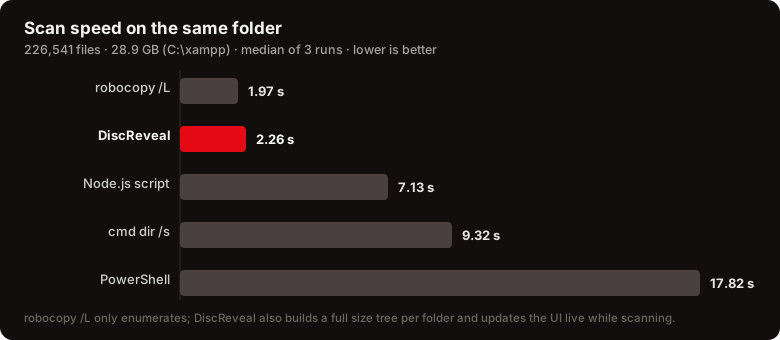
Around 200,000 files, 14.95 GB, five methods on the same folder. DiscReveal displays the finished results in 1.19 seconds — including scanning, data transfer and interface rendering.
Method and scope
Intel Core i7-6700K, Samsung 860 EVO SATA SSD, warm Windows file cache, median of five runs per method. DiscReveal: the published Windows app, already open in list view, measured from a real click to the fully displayed final results. Commands: process start to completion, without printing file lists to the screen. Actual times depend on your drive and files.
This test compares drive scanning with Windows commands and a script, not other graphical disk analyzers. It does not measure duplicate search.